
CMMC vulnerability management security scanning is where contractors most often confuse activity with control. They run scans — sometimes very expensive scans — and assume the domain is covered. Then the assessor asks a question no scan report answers: “Pick a critical finding from three months ago and walk me from discovery to verified fix.” Silence. In my readiness work with Tier 2 and Tier 3 contractors, vulnerability management fails not because scanning is missing, but because the loop around the scanning — prioritization, remediation windows, verification, records — was never built. This article covers what the loop looks like and the evidence that proves it operates.
Scanning Is Not a Program
The relevant NIST SP 800-171 practices ask for three things: identify vulnerabilities in your systems periodically, remediate them according to risk, and do both on an ongoing basis. Notice the structure — identification, response, and recurrence. A scan satisfies only the first, only once.
Here’s the failure pattern I see most: a contractor buys a scanning tool or hires a firm, runs a scan before the assessment, and files a 200-page PDF of findings. That PDF is not vulnerability management. It’s a photograph of a problem. What a C3PAO assessor tests is whether the photograph triggered a process: were the criticals fixed, in what timeframe, verified by whom, and does the cycle repeat on a schedule? A scan report with no remediation trail is arguably worse than no scan at all — it documents that you knew and didn’t act.
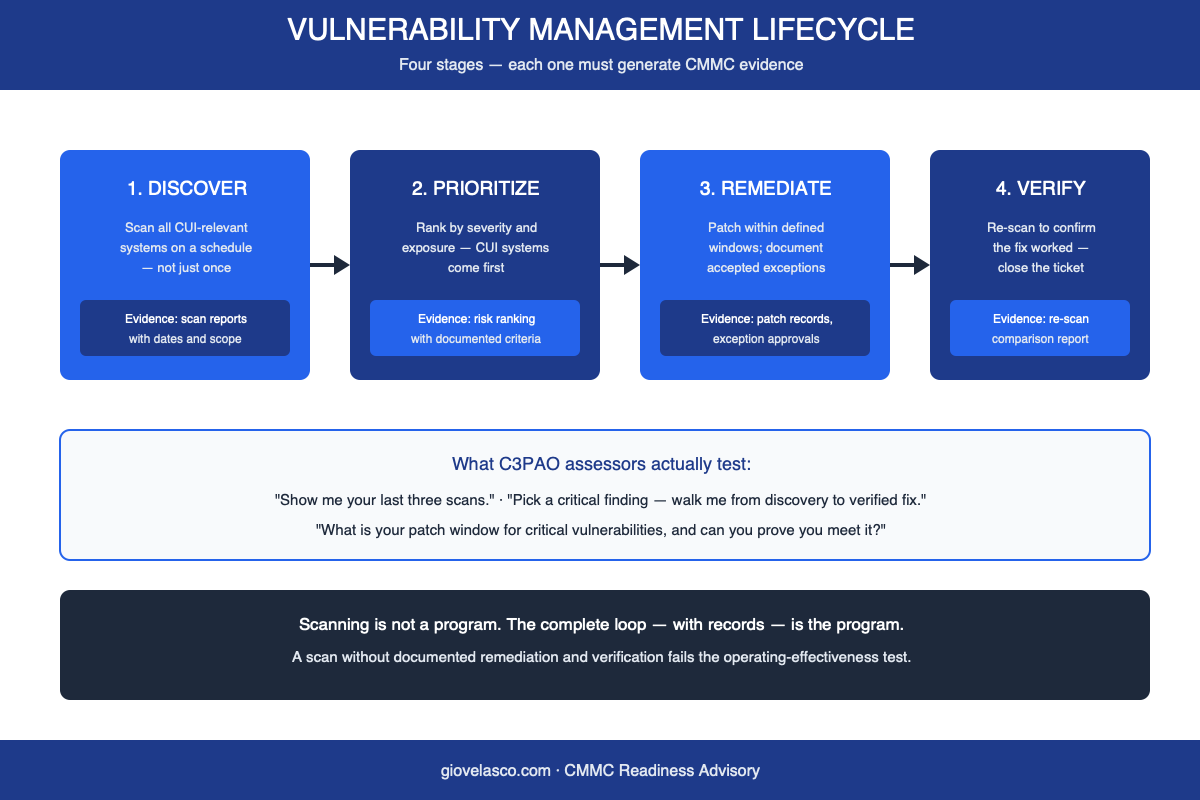
The Four-Stage Loop CMMC Vulnerability Management Security Scanning Feeds
- Discover. Authenticated scans of every system in the CUI boundary, internal and external surfaces, on a fixed schedule — monthly is the defensible norm for CUI environments. Tools matter less than coverage: Nessus, OpenVAS, or your MSP’s platform all work if they see everything.
- Prioritize. Rank findings by severity and exposure, with CUI-touching systems first. Document the criteria — “CVSS 9+ on CUI systems: 7 days; high: 30 days” — because the documented criteria are themselves evidence.
- Remediate. Patch within your stated windows. Where you can’t patch — legacy machine controllers are the classic case in manufacturing — document the exception: compensating controls, business justification, approval, expiry date.
- Verify. Re-scan and confirm the finding is gone. Close the ticket with the comparison attached. This stage is the one most programs skip, and it’s the one that converts “we patched” from a claim into a record.
What Assessors Actually Test
Three questions come up in nearly every assessment of this domain. First: “Show me your last three scans.” This tests recurrence — three dated reports prove a schedule; one proves a scramble. Second: “Pick a critical finding and walk me through it.” This tests the loop end to end: discovery date, prioritization decision, remediation ticket, verification re-scan. Third: “What’s your patch window for critical vulnerabilities, and can you prove you meet it?” This tests whether your documented policy and your operational reality are the same thing — assessors will diff your stated windows against actual ticket timestamps.
Notice that all three questions are answerable only from records. That’s the common thread across every CMMC domain — I’ve written the same story about access control and configuration management — and it’s why the fix is always evidence discipline, not more tooling.
Building the Program in 60 Days
Weeks 1–2: establish coverage. Inventory the CUI boundary and confirm your scanner sees all of it with credentials. Unauthenticated scans of half your environment produce confident-looking reports about the wrong things. If you need a free start, CISA’s vulnerability scanning service covers internet-facing surfaces at no cost.
Weeks 3–4: write the policy you’ll actually follow. One page: scan frequency, severity thresholds, patch windows, exception process, named owner. Resist aspirational windows — a 7-day critical window you miss every month is assessment evidence against you; a 14-day window you consistently meet is evidence for you.
Weeks 5–6: run the first full cycle deliberately. Scan, triage into your ticketing system, patch the criticals, document the exceptions, re-scan, close with verification attached. Expect this first cycle to be slow and to surface debt — that’s normal and useful.
Weeks 7–8: make it boring. Calendar the next scan, brief leadership on the metrics that matter (open criticals, mean time to remediate, exception count), and file the first cycle’s artifacts indexed to practice numbers. By your second or third cycle, the program runs in a few hours a month — and every month adds another dated layer to your evidence position.
The Exception File Is Evidence, Not Embarrassment
One mindset shift worth naming: contractors hide their unpatchable systems from assessors, and it’s exactly backwards. Every environment has them — the CNC controller running an OS from 2012, the vendor appliance you can’t touch. A documented exception with compensating controls (network segmentation, restricted access, enhanced monitoring) and a review date demonstrates mature risk management. An undocumented vulnerable system discovered during assessment demonstrates the opposite. Assessors don’t expect perfection; they expect honesty with a paper trail.
Vulnerability management done right is unglamorous: a monthly rhythm of scan, fix, verify, record. That rhythm — not the tool, not the report thickness — is what demonstrates operating effectiveness when your assessment arrives. If you want a second opinion on whether your loop would survive the three questions above, schedule a discovery call — bring your last scan report and we’ll trace one finding together.